
When we think about reducing our websites’ weight or energy consumption, we usually focus on the big players: images and videos. And that’s good, because that’s where we usually have the most room for improvement.
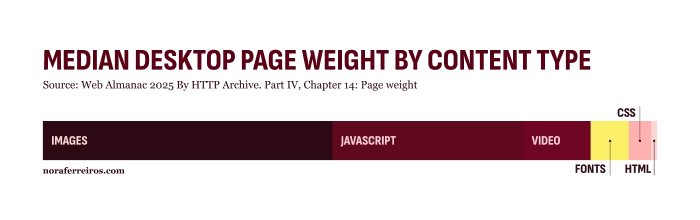
However, although it may not seem so — it’s “just letters”, isn’t it? — fonts can also be a significant source of energy consumption on our websites. In this post, I want you to realize how serious things can get.
But first…
Font Requests, or How Fonts Actually Reach Your Screen
For you to see a website, your browser has to request information from a server in order to display it. This can be images, videos, code, or yes, fonts. Energy is needed to make these requests. That’s why it’s important to be careful with the amount of information we put on a website if sustainability matters to us. More information means more requests, and more requests mean more energy is needed.
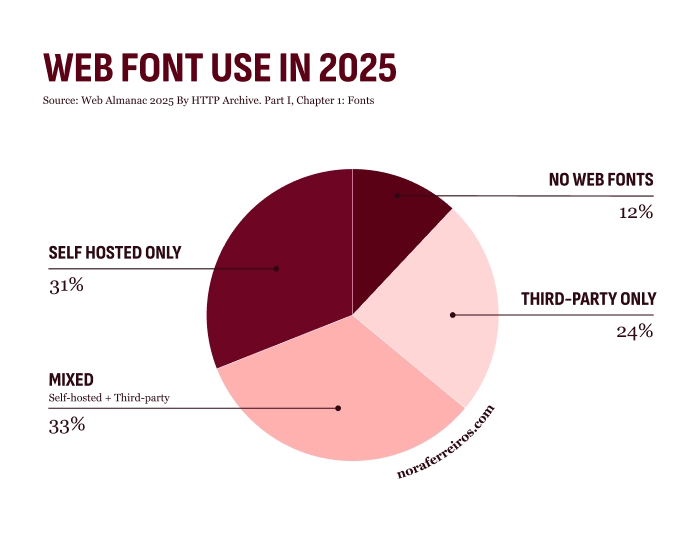
In the case of fonts, there are three different ways for your browser to load them so they can be displayed on your website:
- Third-party web fonts. These are the ones you can find in places like Google Fonts or Adobe Fonts. The font files are hosted on their servers, and when someone visits your website, a request is sent to the font provider for each font file that needs to be displayed.
- Self-hosted web fonts. Also third-party web fonts, but the file requests are made to your own server instead. This is a good option since it allows you to select only the font files you need and optimize them, so you have control over their size and how they are requested.
- System fonts. The ones installed on computers by default. No need to do requests when your website use system fonts: they are loaded locally.
Even though I’d like to write at length about how system fonts are still a good option for achieving great visual results in web design —e.g., my own website—, in this post I’m going to focus on the most common choice: web fonts.
The Average Website Font Requests
Now that we know how we can display the coolest, most stylish, and trending typographies on our websites, it’s time to face what this actually means in terms of energy consumption.
Let’s talk about the typical website.
The most used web font is Roboto. Roboto is a sans-serif font developed by Google. You’ve seen it many times for sure.
The median font file size is around 40 KB. However, the Roboto Regular font file — in woff2 format — is around 60 KB.The average website makes four font requests. In case you’re unsure what that means, four font requests look like this:
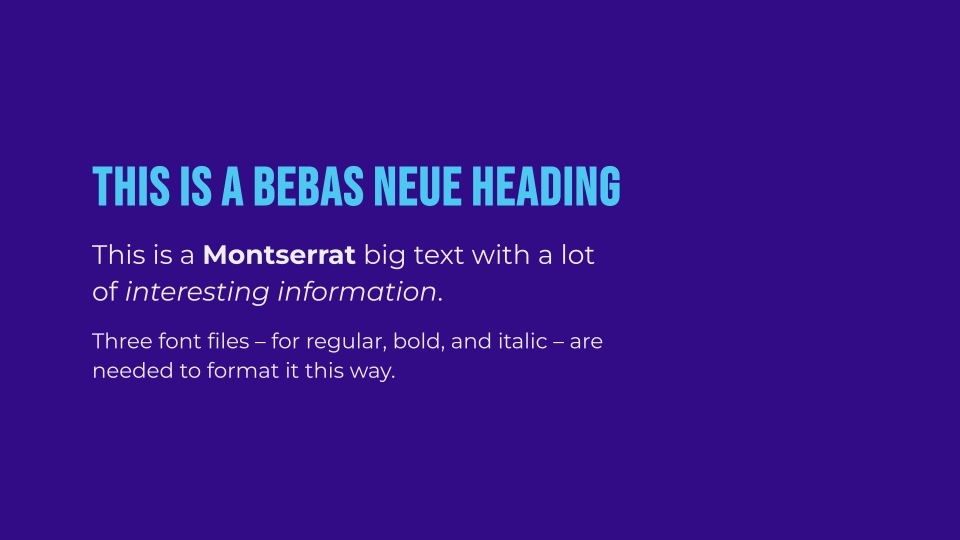
It’s important not to confuse font files with font families.
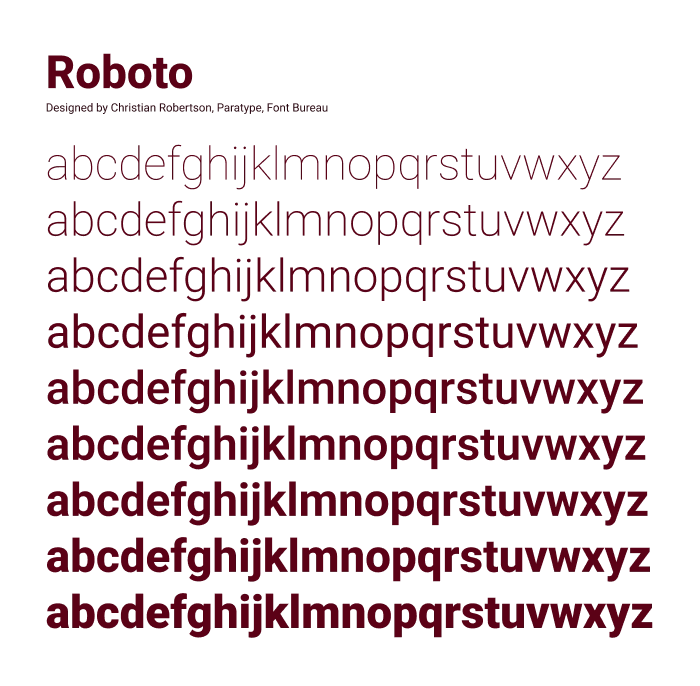
So, the average website’s page weight includes around 160 KB just for fonts. This can go up to 240 KB for websites that use Roboto, which, according to the data, is quite likely.
Put like that, it doesn’t seem like much, does it? How much energy could a website with 160 KB of fonts possibly need? Not much. However, as with many other things in sustainability, it’s not the individual unit or exception that matters — it’s the big picture.
The Big Picture
There are about 1.12 billion — that’s 1,120 million for my European people — websites out there. Around 83% of all existing websites are inactive. Yes, I know, we need to talk about that at some point. But not in this post.
Of the 194 million websites currently active, around 50% make four or more font requests. But the serious part is that 10% —19.4 million websites— make ten or more.
If we take the median font file size as a reference, this means 400 KB or more per website or, in other words, more than 7,400 GB in total. And this is based on the median font file size, not the most commonly used ones or the actual files these websites use, which can escalate quickly.
So, how much energy is needed to load only the font files of that 10% of active websites just once? Well, roughly the same as the electricity consumption of the average European household in a year. That’s quite a lot just for file fonts, isn’t it?
And really, why would anyone need more than ten font requests on a website in the first place? It doesn’t seem like a big effort, and it would make a meaningful difference if we simply kept our websites under ten font requests.
Your Role in All of This
Undoubtedly, images and videos are the main source of energy consumption on websites — and increasingly so. That’s where you should pay attention first if you’re interested in, or concerned about, the page weight of your digital products. But, as we’ve seen, fonts can also become a significant issue if we don’t take their impact into account.
The argument I encounter most often when it comes to reducing fonts in a digital project is the supposed sacrifice in UX or visual quality. Let me tell you something: no website needs ten —or more— font requests to look good. Maybe some artistic experiments or very specific projects do. But I refuse to believe that there are nearly 20 million web pages out there that are works of typographic art.
So, my conclusions or tips regarding the use of fonts on your website are:
- Use as many (font) files as you need. But take a minute to consider if you actually need them.
- System fonts are an option. They may not be appropriate for every project, but it is absolutely possible to achieve great UX and strong visual results with them in many cases. You can call me — I can do it.
- Optimize your font files. Sustainability-focused developers are incredibly good at this.
- Store the files on your own server, so you can use only the necessary resources.
Where to Go from Here
Now that I’ve opened the door to a new environmental and technical concern, what should you do with this information once you finish reading?
There’s no need to redesign your website. As with many things in sustainability, the goal is improvement, not perfection. Some examples:
- Check how many font requests your website makes. You can ask your developer, or use a tool like this one. Remember: a font family is not the same as a font file.
- Analyze whether it’s possible to maintain visual quality or user experience by optimizing files or replacing current fonts with lighter alternatives. You may need to call
Ghostbustersa developer and a designer for this. - If you are about to start a new website project and digital sustainability matters to you, it’s a good idea to choose professionals who work with a sustainable approach by default, so you don’t need to audit and fix things later.
Some readings to explore the topic further
This is a problem-focused post, but fortunately there are many great articles that go deeper into the solutions. You may be interested in take them a look to know what’s more suitable for your project:
- Web Fonts and Sustainability by Mightybytes
- Optimising web fonts for sustainable websites by Paul Jardine and Becky Thorn
- The performance cost of custom web fonts, and how to solve it by Wholegrain
- To subset or not subset fonts by Eric W. Bailey
Bibliography
- Web Almanac 2025 By HTTP Archive. Part I, Chapter 1: Fonts
- Web Almanac 2025 By HTTP Archive. Part IV, Chapter 14: Page weight
- Reboot Website Statistics Report 2026
- How Many Websites Are There? (2026 Stats)
- Electricity prices for households with an annual consumption of 1,000 to 2,500 kWh in the European Union in 2024, by country
- Electricity prices for households with an annual consumption of 2,500 to 5,000 kWh in the European Union in 2024, by country
- How much CO2 does a website produce?
Leave a Reply